What Are Pre-Made Website Blocks and How Do They Work?


A complete guide to understanding pre-built design blocks and how they help you build stunning websites in a fraction of the time.
Imagine building a house without pre-cut lumber or ready-made fixtures; you’d have to craft every single piece from scratch. Website building used to work exactly like that. Pre-made website blocks changed everything.
If you’ve ever used Elementor or any modern page builder, you’ve likely come across the concept of blocks or widgets. But what exactly are they, and why are web designers and business owners around the world switching to block-based workflows?
In this guide, we’ll break down everything you need to know: what pre-made website blocks are, how they work under the hood, and why using them gives you a massive advantage when building modern websites.
| 64% of small business websites are now built using page builders Web creators who use pre-built block systems report saving an average of 60% of their development time compared to custom-coded sites. |
What Exactly Are Pre-Made Website Blocks?
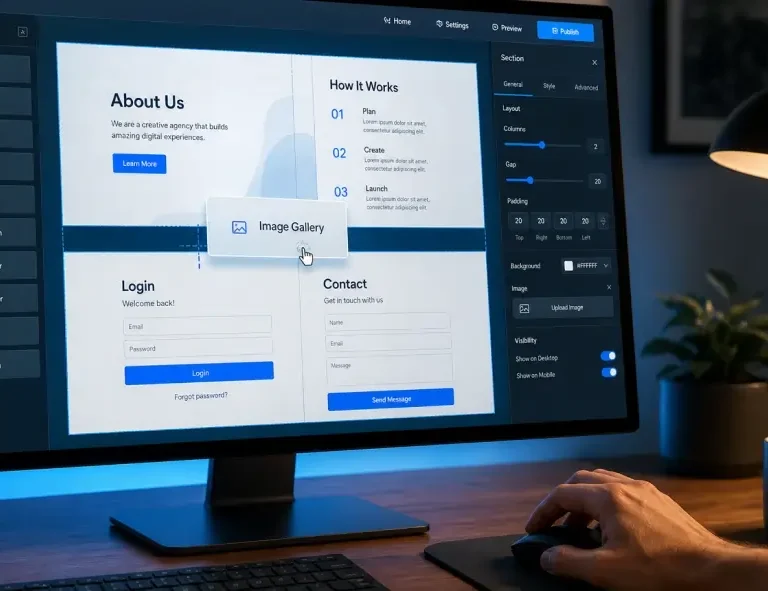
Pre-made website blocks, also called content blocks, sections, or widgets, are ready-built design components that you can drop into any webpage without writing a single line of code. Each block serves a specific purpose on your website.
Think of them like LEGO pieces. Each piece has a specific shape and function. Stack them together, and you can build virtually anything: a homepage, landing page, portfolio, or e-commerce store in hours instead of weeks.
Quick Fact
The first major website page builder with drag-and-drop block components launched in 2013.
Today, over 43% of all websites on the internet are powered by WordPress,
and the majority of those use block-based builders like Elementor for design.
Common Types of Pre-Made Blocks
- Testimonials: Show social proof from clients
- Sliders: Image & content carousels
- Headers & Footers: Site navigation & links
- Blog Layouts: Display posts in grids or lists
- Callout Boxes: Highlight key messages
- Service Blocks: Showcase your offerings
- Content Blocks: Full section layouts
How Do Pre-Made Blocks Actually Work?
Understanding the mechanics behind website blocks helps you use them more intelligently. Here’s what happens behind the scenes when you drag and drop a block into your page:
- The block loads as a registered widget
When a plugin like OneClickBlocks is installed, it registers each widget with Elementor’s editor. The plugin’s PHP code tells Elementor: “Here’s a new block with these customization controls.” - You drag it into your page canvas
Elementor’s editor lets you place the block anywhere on your page in real time. You see the live preview update as you design. - You customize via the control panel
Each block comes with settings like color pickers, font selectors, spacing controls, and content fields, all without touching CSS or HTML. - Elementor renders clean HTML/CSS
Behind the scenes, Elementor converts your drag-and-drop design into optimized HTML and CSS that the browser displays to your visitors. - It adapts across all screen sizes
Good blocks are fully responsive. They automatically reflow for mobile, tablet, and desktop, with no extra work from you.
| Did You Know?
The average web page contains 3–8 distinct section blocks. With pre-made blocks, what once took a developer 3–5 days to custom-build can be assembled in as little as 2–4 hours, even by complete beginners. |
“Design is not just what it looks like and feels like. Design is how it works.”
— Steve Jobs, Co-founder of Apple

This quote rings especially true for pre-made blocks. The beauty of a well-designed block isn’t just its visual appeal; it’s that it works reliably, loads fast, and requires zero technical knowledge to implement.
Pre-Made Blocks vs. Custom Coding vs. Themes: Which Wins?
There are three main ways to design a WordPress website today. Each has its trade-offs. Here’s an honest comparison:
| Feature | Custom Coded | Theme Templates | Pre-Made Blocks |
| Time to Launch | Weeks to months | 2–5 days | Hours |
| Coding Required | Yes – advanced | Basic CSS helpful | None |
| Design Flexibility | Unlimited | Limited by theme | High |
| Cost | Very high ($2k–$20k+) | Low–Medium | Free to Low |
| Maintenance | Requires developer | Medium effort | Minimal |
| Performance | Optimized | Varies widely | Fast (if built right) |
| Best For | Enterprise / Complex apps | Starter blogs | Freelancers, SMBs, Agencies |
7 Key Benefits of Using Pre-Made Website Blocks
Still on the fence? Here are the most compelling reasons why thousands of web creators have made the switch to block-based design:
Speed: Build full pages in hours, not days. Pre-made blocks eliminate the need to design from a blank canvas every single time.
Consistency: Every block is designed to work visually together, giving your site a professional, cohesive look without extra effort.
No code needed: Non-technical users can build sophisticated, professional-looking websites without hiring a developer.
SEO-friendly output: Well-built blocks generate clean, semantic HTML that search engines can crawl and index efficiently.
Fully responsive: Every block adapts automatically to mobile, tablet, and desktop, your site looks great everywhere.
Customizable: Despite being pre-made, blocks let you change colors, fonts, spacing, images, and content to fully match your brand.
Lightweight performance: Quality block plugins (like OneClickBlocks) are built with optimized code so they don’t bloat your site or slow page loads.
| Performance Fact
Google’s Core Web Vitals update made page speed a direct ranking factor. Bloated plugins with heavy scripts can lower your score significantly. OneClickBlocks is engineered specifically to avoid this, delivering only clean, minimal code with zero feature bloat. |
Who Should Use Pre-Made Website Blocks?
The honest answer? Almost everyone is building a WordPress website. But let’s break it down by use case:
Freelancers
Deliver client websites faster and take on more projects without sacrificing quality. Pre-made blocks let you build consistent, beautiful sites at scale.
Agencies
Maintain design consistency across all client projects and speed up internal workflows. One addon, dozens of widgets, no more juggling five different plugins.
Business Owners
Launch or update your own site without waiting for a developer. Control your website directly in Elementor with an intuitive drag-and-drop design.
Bloggers & Creators
Design stunning blog layouts, callout sections, and content pages that look polished and load fast, no design skills required.
| Did You Know?
Elementor powers over 12 million active websites worldwide, making it the most popular WordPress page builder on the planet. With an addon like OneClickBlocks, you unlock even more powerful, purpose-built widgets without adding extra plugin weight. |
“The best design tool is the one that helps you work faster without getting in your way.”
— Paul Rand, Legendary Graphic Designer

How to Choose the Right Block Plugin for Elementor
Not all Elementor addon plugins are created equal. Here’s what to look for when picking one:
- Lightweight codebase: Choose plugins that only load scripts when the widget is actually used on a page, not on every page load.
- Comprehensive widget library: You want all the essential widgets in one place, testimonials, sliders, headers, footers, blog layouts, and more, so you don’t need 4 separate plugins.
- Regular updates & support: An actively maintained plugin is critical for security and compatibility with the latest Elementor and WordPress releases.
- Works with Elementor Free: Many addons require Elementor Pro. Look for ones that work with the free version too, for maximum flexibility.
| Meet OneClickBlocks
The Smarter Way to Build with Elementor Get 10+ essential widgets: Testimonials, Sliders, Headers, Footers, Blog Layouts, Callouts, and more, all in one fast, lightweight Elementor addon. No bloat. No coding. Just beautiful results. |
What Makes OneClickBlocks Different?
There are dozens of Elementor add-on plugins available. Here’s why OneClickBlocks stands out:
| What You Get | Most Bloated Plugins | OneClickBlocks |
| Essential widgets only | ❌ 80+ widgets you’ll never use | ✅ 10+ focused, must-have widgets |
| Performance impact | ❌ Heavy scripts, slow load | ✅ Lightweight & optimized |
| Works with Elementor Free | ❌ Often requires Pro | ✅ Works with Free & Pro |
| Coding required | ❌ Sometimes | ✅ Zero code needed |
| Free version available | ⚠️ Very limited | ✅ Generous free tier |
Final Takeaway: Blocks Are the Future of Web Design
Pre-made website blocks aren’t just a shortcut; they’re a smarter way to build. By combining the power of Elementor with a dedicated block addon like OneClickBlocks, you get everything you need to create fast, beautiful, responsive websites without writing code, installing ten different plugins, or burning out your creativity on repetitive design work.
Whether you’re a freelancer looking to deliver faster, an agency scaling your design process, or a business owner building your first website, pre-made blocks are the most efficient, reliable, and creative path forward.
The best website you’ve ever built is just a few blocks away.